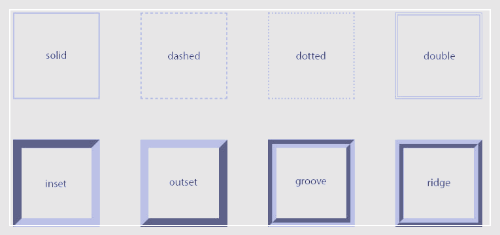
<!DOCTYPE html>
<html>
<head>
<style>
p.dotted {border-style: dotted;}
p.dashed {border-style: dashed;}
p.solid {border-style: solid;}
p.double {border-style: double;}
p.groove {border-style: groove;}
p.ridge {border-style: ridge;}
p.inset {border-style: inset;}
p.outset {border-style: outset;}
p.none {border-style: none;}
p.hidden {border-style: hidden hidden solid hidden;}
p.mix {border-style: dotted dashed solid double;}
</style>
</head>
<body>
<h2>The border-style Property</h2>
<p>This property specifies what kind of border to display:</p>
<p class="dotted">A dotted border.</p>
<p class="dashed">A dashed border.</p>
<p class="solid">A solid border.</p>
<p class="double">A double border.</p>
<p class="groove">A groove border.</p>
<p class="ridge">A ridge border.</p>
<p class="inset">An inset border.</p>
<p class="outset">An outset border.</p>
<p class="none">No border.</p>
<p class="hidden">A hidden border.</p>
<p class="mix">A mixed border.</p>
</body>
</html>
두께..
<!DOCTYPE html>
<html>
<head>
<style>
p.one {
border-style: solid;
border-width: 5px 20px; /* 5px top and bottom, 20px on the sides */
}
p.two {
border-style: solid;
border-width: 20px 5px; /* 20px top and bottom, 5px on the sides */
}
p.three {
border-style: solid;
border-width: 25px 10px 4px 35px; /* 25px top, 10px right, 4px bottom and 35px left */
}
</style>
</head>
<body>
<h2>The border-width Property</h2>
<p>The border-width property can have from one to four values (for the top border, right border, bottom border, and the left border):</p>
<p class="one">Some text.</p>
<p class="two">Some text.</p>
<p class="three">Some text.</p>
</body>
</html>
'HTML_CSS' 카테고리의 다른 글
| HTML 자동 완성 (에밋 Emmet) (0) | 2024.11.06 |
|---|---|
| 시멘틱 태그란 무엇일까요? (4) | 2024.11.06 |
| HTML 목록을 이용한 메뉴만들기 (0) | 2024.11.04 |
| 목록 스타일 (List Style) (0) | 2024.11.04 |
| HTML에서 border 속성 (2) | 2024.11.04 |